
Better Step Count
Release Notes
V0.4.2
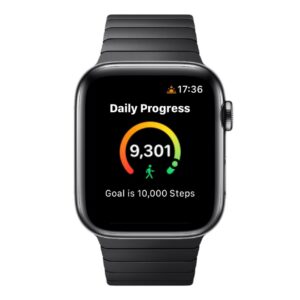
- Watch app and complications
Watch App
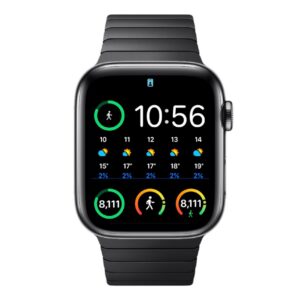
Complications
- Tap on complication to launch app
V0.3.1
- Card for simple view of daily step counts
- Choose simple view or comparison view
- Consistent UI for all metric cards
- Navigate to detail data from most cards
User Guide
Daily Step Count Cards
Two views of your daily step counts are available: Simple View and Comparison View. These views are used throughout the app whenever daily step counts are shown.
Simple View
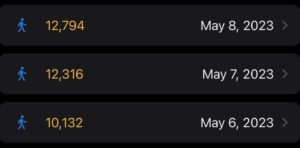
- View Elements:
- Better Step Count
- Date
- View Preferences:
- Colour Settings for step count
Comparison View
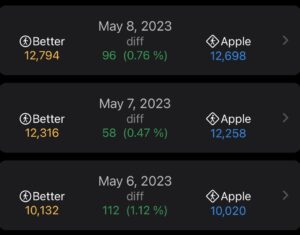
- View Elements:
- Date
- Better Step Count
- Apple Step Count
- Difference (Better – Apple)
- View Preferences:
- Color settings for step counts
- Difference always shows in green
- Default colors shown above
Switch Between Simple and Comparison View
< insert picture here >
- During the Beta, users can switch between the Simple and Comparison views on the Settings screen
- This setting switches the display format throughout the app
- Note the Better and Apple counts should always be the same for users who have an iPhone only (e.g. no Watch)
- The comparison view will not be available to these users in the final version that ships to the App Store
Metric Cards
< insert picture here >
- Three metric cards are available in the app at this time:
- Your Current Streak
- Your Grand Total
- Your Best Day
- More cards may be added in future releases